
Webhooks
With the Webhook Delivery Service, you can send your form submissions to external systems by configuring webhooks for your form in Form.taxi.
What are Webhooks?
Webhooks provide a simple and efficient way to deliver real-time events to external services. Instead of repeatedly polling a system, a webhook automatically sends an HTTP request to a predefined URL whenever a specific event occurs — in the case of Form.taxi, a new form submission. This allows external applications to immediately react to incoming data, trigger workflows, or process information further. Webhooks are a lightweight and highly efficient method for integrating systems with each other.
Setup
With the webhook feature, you can forward form submissions to other apps and services. To use webhooks in Form.taxi, simply configure your form's webhook URL.
Once set up, all new form submissions will automatically be sent to the webhook URL you provided as soon as they are received.
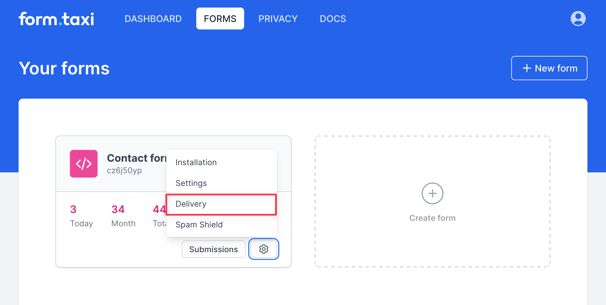
- Open the form's delivery settings. List of your forms
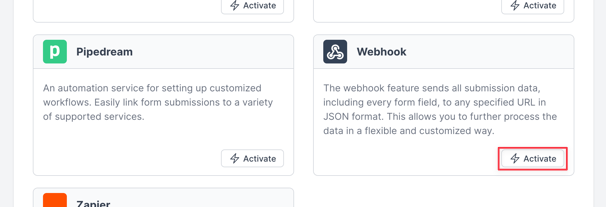
- Activate the "Webhook" delivery feature.
- Enter your target URL in the webhook settings.
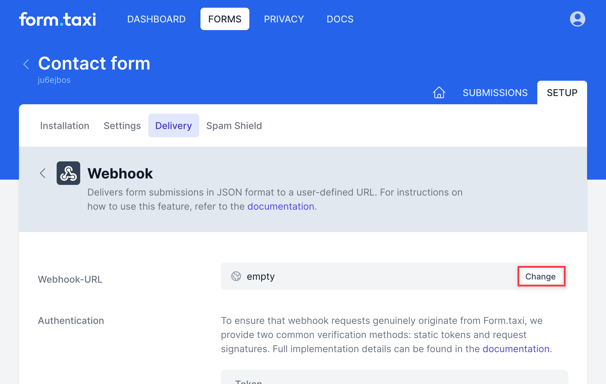
Your form's webhook integration is now fully configured and ready to deliver form data to the specified URL.
Submission Data
When the webhook is triggered, the submission data is sent as a POST request in JSON format to the configured web address (URL).
Example JSON Structure
{
  "submission_id": "EJg90qoBWzkxh0hYuoTQ3fHyTWFv4mCF",
  "submitted_at": "2025-11-27T11:51:26+01:00",
  "inputs": {
    "My Name": "Emma Pollarde",
    "Email": "demo@mailinator.com",
    "Your Message": "How are you doing?"
  },
  "inputs_summary": "MY NAME: Emma Pollarde, EMAIL: demo@mailinator.com, YOUR MESSAGE: How are you doing?",
  "attachments": [
    {
      "fieldName": "Picture",
      "fileName": "filename.jpg",
      "fileSize": 810097,
      "url": "https://form.taxi/download/GVsOkzZxF4JBpoPD/filename.jpg"
    },
    {
      "fieldName": "Document",
      "fileName": "filename.pdf",
      "fileSize": 1086378,
      "url": "https://form.taxi/download/2xTvyrtTAmMeC3sN/filename.pdf"
    }
  ],
  "panel_url": "https://form.taxi/panel/form/submission/EJg90qoBWzkxh0hYuoTQ3fHyTWFv4mCF"
}
The inputs object contains all submitted form fields with their field names and values. Please note that the content here is dynamic, depending on the input fields present in the form. If file attachments were submitted along with the form, they are included in the attachments array.
Request-Headers
Content-Type 	        application/json
User-Agent 	            FormTaxi-Webhook/1.0
Idempotency-Key 	    d477e8e263365a9252eba5aue427ceb2
X-FormTaxi-Timestamp 	1763823601
X-FormTaxi-Token 	    whtk_oSde7NGktXkPVPnd2ryQ7qr0yTf54iaz
X-FormTaxi-Signature v1=3244f570aabd42c155fa72c522538a5185dfba8e62c56e8b9e8aebabe41c8a82- The
Idempotency-Keyheader contains a random value that is different for every request. This allows the receiving system to detect and prevent duplicate processing by comparing the key. X-FormTaxi-TimestampThe Unix Timestamp header indicates when the request was created.- The Token and Signature headers are used for authentication. Details are provided in the following section.
Authentication
Webhook endpoints should only accept requests that originate from the intended service. To ensure that incoming webhook requests are trustworthy and have not been tampered with, Form.taxi offers two authentication methods. These allow recipients to verify both the origin and integrity of the request and ensure secure communication.
Static Token
A Static Token is the simplest form of webhook authentication. A secret token is generated and shared only between Form.taxi and the webhook recipient. Form.taxi includes this token in every webhook request via the following header:
X-FormTaxi-Token: <token>The recipient simply checks whether the received token matches the expected value. If it does, the request is considered authentic. You can find your token in the webhook settings.
Signature (HMAC Signature)
If you require enhanced security, you can enable signature verification. Form.taxi cryptographically signs each webhook request, allowing you to verify with certainty that the request was sent by Form.taxi and that its content has not been altered.
To do this, Form.taxi sends two headers:
X-FormTaxi-Timestamp: <unix timestamp>
X-FormTaxi-Signature: v1=<hex digest>
How is the signature calculated?
The signature is calculated using two values:
- The Unix timestamp (sent as a header)
- The unmodified JSON body of the request (raw body)
These two values are combined into the following string:
<timestamp>.<raw_body>This string is then signed using your webhook secret with HMAC-SHA256. You can find the secret key in the webhook settings. The result is a hex digest, transmitted in the X-FormTaxi-Signature header.
To validate the request, compute the same signature on your end and compare it to the value received via the header. If both values match — and the timestamp is within a valid time window — you can be confident that the request is authentic and has not been tampered with.
Execution Flow
Form.taxi considers a webhook execution successful when your application responds with a success status (HTTP 2xx).
If no success status is returned, Form.taxi will retry the request every 15 minutes until a successful response is received. Retry attempts continue for up to 24 hours after the original form submission.